Add a translator to your chat in a few clicks.
Connect your Twitch and TripsTranslator joins your channel automatically. When a viewer sends a message in another language, it detects the language and posts the translation in your channel's language. No config files, no downloads.
- 1Connect with Twitch — on Twitch's own login.
- 2Authorize — confirm you own the channel.
- 3Go live & /mod TripsTranslator — recommended so it beats slow/follower mode.
Pricing
One plan. Everything included. No translation limits.
- Now – Nov 30Free beta. Nothing changes.
- Dec 1The beta ends. December is free for every channel — no card needed.
- Jan 1Billing starts. Subscribe to keep the bot in your chat.
- ✓ Unlimited translations in your chat
- ✓ Every feature and command, including new ones as they ship
- ✓ 30 days free for new channels — no card to start
- ✓ Pause with !trstop, remove anytime with !trleave
When subscriptions and donations reach $3,500, every currently active subscriber gets a free month, and the price drops to $1.99/month for everyone.
Subscriptions count from Jan 1, after payment-processing fees. There's no set date — it depends on how many channels join. Subscribe after that day and you get the lower price, but not the free month.
Do I need a credit card to try it?
No. Connect with Twitch and the bot joins your chat. New channels get 30 days free with no card. You only pay if you decide to subscribe.
What happens when my free time ends?
If you haven't subscribed, the bot quietly leaves your chat — it never announces it there. We'll send you a private reminder a few days before. Subscribe anytime and it comes back.
How do I cancel?
Go to Manage billing and cancel. You keep the bot until the end of the month you paid for, and you won't be charged again. Typing !trleave also stops your subscription, but it removes the bot right away.
Do you give refunds?
Payments aren't refunded once a month has started, including partial months. When you cancel, you keep the bot until your paid month ends. Details are in our Terms of Service.
How can I pay?
Payments are handled by Stripe. You can pay by card, Apple Pay, Google Pay, and the other options Stripe shows at checkout for your country and device. We never see or store your full card number.
What if a payment fails?
Stripe tries again and emails you. The bot keeps running for a short grace period. If the payment still hasn't gone through, the bot leaves your chat until it does.
Is it in US dollars? What about taxes?
Yes, the price is in US dollars. Your bank may add a currency-conversion fee. Any tax that applies is shown at checkout before you pay.
I was in the beta. What happens to my channel?
Thank you for testing! You don't need to do anything now. December is free for you like every other channel, and billing starts Jan 1. Subscribe any time in December to keep the bot without a gap.
Prices can change. Subscribers get at least 30 days' notice before any increase. Full details in our Terms of Service.
💜 Help hit the goal. Every subscription and donation goes toward the infrastructure costs that keep TripsTranslator running. When the bar hits $3,500, everyone subscribed at that time gets a free month and the price drops to $1.99/mo.
Commands
Foreign chat is translated automatically — these are for on-demand use and mod controls.
(automatic)Foreign chat is translated into your channel's language on its own — no command needed.!trlang <lang>Broadcaster: pick the language chat is translated into — English by default, e.g. !trlang spanish.!tr <lang> <text>One-off translate into any language, e.g. !tr korean hello.!es !fr !de …Code shortcuts for every language above — !es !fr !de !it !pt !ru !ja !zh !ko !ar !hi !nl !pl <text>, e.g. !ja nice stream. (Turkish is !tr turkish, since !tr is the general command.)!trstop [time]Mods & broadcaster: pause translations — add any length to resume on its own (5m, 20m, 2h). Also !trpause.!trstartMods & broadcaster: turn translations back on.!trignore <user>Mods & broadcaster: stop translating one account — a spammer, a troll, or another bot that keeps echoing the translations. !trunignore <user> undoes it; !trignore on its own lists who’s ignored.!trstatusCheck whether translations are running, or how long a pause has left.!trhelpShow how to use the bot in chat.!langsList the supported languages.!trfix <text>Broadcaster: fix a bad translation — reply to it with the right text. Experimental, see how it works.!trfixmods on|offBroadcaster only: let your mods make fixes too (off by default).!trleaveBroadcaster only: remove the bot from your channel.Mods can also just say it in chat — “pause translations for 15 minutes” or “translations back on” work without a command.
Fix a bad translationEXPERIMENTAL
AI gets slang wrong sometimes. When it does, you can teach the bot the right translation for your channel. Next time someone types that same phrase, your version is posted instead.
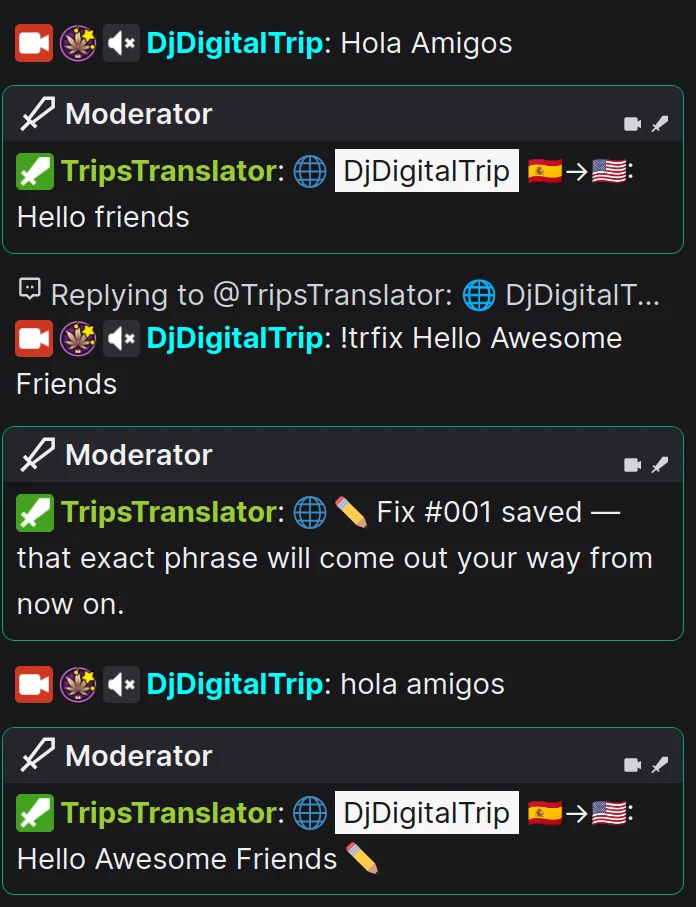
- Reply to the bad translation with !trfix <right text>. No reply? It fixes the bot’s latest translation.
- Exact phrase only. A fix for “hola amigo” won’t change “hola amigos”. Capital letters and punctuation don’t matter.
- Every fix gets a number. Change one: !trfix #001 <new text>. Remove one: !trunfix #001. See how many you have: !trfixes.
- Fixes only apply in your channel, to automatic translations (not the !tr / !es shortcuts). Up to 50 per channel. Corrected lines are marked with ✏️.
- Only the broadcaster can make fixes, unless you turn on !trfixmods on. No links allowed in a fix.
- Coming soon: a My fixes page to review all your fixes in one place.
Supported languages
Set your channel's language with !trlang — the options are below. Anyone can translate a single line into another language with !tr.
+ viewers can also write in: Afrikaans · Albanian · Amharic · Armenian · Azerbaijani · Basque · Belarusian · Bengali · Bosnian · Bulgarian · Burmese · Catalan · Cebuano · Croatian · Danish · Esperanto · Estonian · Filipino · Finnish · Frisian · Galician · Georgian · Gujarati · Haitian Creole · Hausa · Hawaiian · Hebrew · Hmong · Hungarian · Icelandic · Igbo · Irish · Javanese · Kannada · Kazakh · Khmer · Kurdish · Kyrgyz · Lao · Latin · Latvian · Lithuanian · Luxembourgish · Macedonian · Malagasy · Malay · Malayalam · Maltese · Maori · Marathi · Mongolian · Nepali · Norwegian · Odia · Pashto · Persian · Punjabi · Samoan · Scots Gaelic · Serbian · Sesotho · Shona · Sindhi · Sinhala · Slovak · Slovenian · Somali · Sundanese · Swahili · Tagalog · Tajik · Tamil · Tatar · Telugu · Turkmen · Urdu · Uyghur · Uzbek · Welsh · Xhosa · Yiddish · Yoruba · Zulu